
Marketing Services
Choose your services
Advertising
Advertising OverviewPremium InventoryAudiencesTargetingGeofencingReportingConnected TVStreaming AudioPre-Roll VideoNative AdvertisingDisplay AdvertisingResources
News & InsightsSample AI ReportAdvertising DemoSet where and when ads run
Combine location, device, schedule and frequency settings. Target broad regions or specific neighborhoods and venues.
Geographic coverage
210
Market Areas
Nielsen & Comscore
30K+
US Cities
with population data
41K+
ZIP Codes
every US ZIP code
∞
Custom Polygons
draw any shape
8
Stackable Layers
include / exclude
Eight Geo Targeting Layers
Start broad and narrow down, or stack any combination. Each layer is independently include / exclude, so you can target a state but carve out a metro, draw a polygon and exclude a ZIP, or layer a radius geofence on top of a Market Area.
Countries
2Run campaigns in the United States, Canada, or both. Each country is independently include/exclude-able.
ex: United States · Canada
States & Provinces
50 + DC + 13Target one state or province, a region, or any combination. Every US state plus DC, and all 13 Canadian provinces and territories.
ex: California + Nevada + Arizona
Market Areas
210All Nielsen & Comscore Market Areas, ranked by TV household universe size. The same boundaries used by broadcast TV, which makes them ideal for CTV and video.
ex: Dallas-Ft. Worth (#5) · Houston (#6)
Cities
30,000+Major US cities and metros with population data and lat/lng coordinates baked in. Stack with state targeting to fine-tune regional buys.
ex: Portland, OR · Edmond, OK
ZIP & Postal Codes
41,000+Every US ZIP code with city and state, plus 1,650+ Canadian postal areas. Pin-point local targeting for retail trade areas, school districts, and neighborhood-level buys.
ex: 73102 · 73103 · 73104
Addresses
Bulk uploadSearch for a street address or upload a list of them, then target each location for stores, offices, dealerships, and venues.
ex: Every store in a 40-location chain
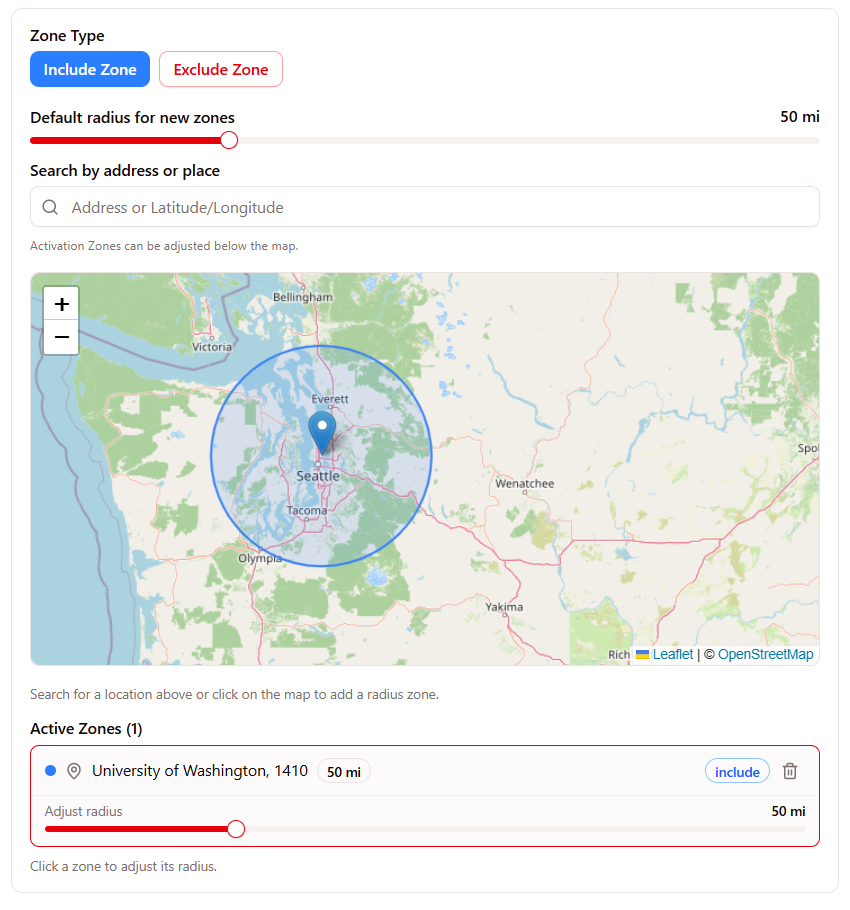
Radius Geofence
CustomDraw circular geofences around any address or coordinate. Set the radius in miles, include or exclude, layer multiples in the same campaign.
ex: 25 mi around 1234 Main St
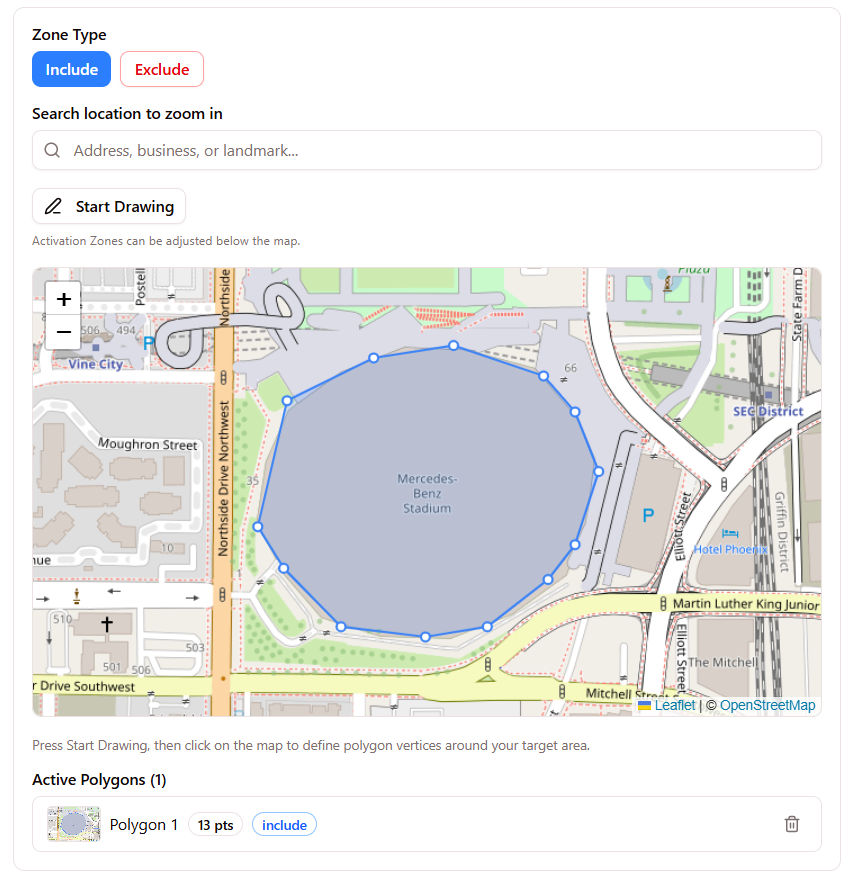
Polygon Geofence
UnlimitedDefine custom polygon shapes from coordinate arrays for boundaries circles can't capture: stadiums, neighborhoods, event venues, retail footprints.
ex: Downtown core + arena footprint
Every layer supports include and exclude modes. Combine in any order.
Draw your target area
Create radius geofences around any address or define custom polygon shapes for stadiums, malls, neighborhoods, or event venues.
Inside the wizard · Radius geofence
Inside the wizard · Polygon geofence
Example use cases
Downtown Tampa Office
100 N Tampa St, Tampa FL 33602
University of South Florida
Custom campus boundary
Map visualizations are illustrative. Real geofences activate against live programmatic inventory in target locations.
210 US Market Areas
Buy media by Market Area, the same geographic boundaries used by broadcast TV. Use them for regional and metro-level campaigns.
Top 10 Markets by TV Households
New York, NY
Los Angeles, CA
Chicago, IL
Philadelphia, PA
Dallas-Ft. Worth, TX
Houston, TX
Atlanta, GA
Washington, DC
Boston, MA
San Francisco-Oakland-San Jose, CA
+ 200 more markets covering 100% of US households
Beyond Geography
Set which devices receive your ads, when they run and how often people see them.
Device Targeting
Choose any combination of five device types per campaign or audience group.
Dayparting
Run ads only during specific hours and days of the week. Use this for business hours, drive-time or weekend campaigns.
| 12a | 4a | 8a | 12p | 4p | 8p | |||||||||||||||||||
|---|---|---|---|---|---|---|---|---|---|---|---|---|---|---|---|---|---|---|---|---|---|---|---|---|
| Mon | ||||||||||||||||||||||||
| Tue | ||||||||||||||||||||||||
| Wed | ||||||||||||||||||||||||
| Thu | ||||||||||||||||||||||||
| Fri | ||||||||||||||||||||||||
| Sat | ||||||||||||||||||||||||
| Sun |
Example: business hours, Mon–Fri 8 AM – 6 PM
Frequency Capping
Limit how often each user sees your ads to avoid fatigue. Caps available per hour, day, week, month, or campaign lifetime.