
Marketing Services
Choose your services
Advertising
Advertising OverviewPremium InventoryAudiencesTargetingGeofencingReportingConnected TVStreaming AudioPre-Roll VideoNative AdvertisingDisplay AdvertisingResources
News & InsightsSample AI ReportAdvertising DemoGeofencing for local reach
Draw a radius around any address or a custom polygon around any shape, then reach the devices inside, on every screen. Venues, events, competitors, neighborhoods. Build it yourself in minutes.
No credit card required to explore the platform.
Downtown arena
3 mi radius geofence
What geofencing on Manifold gives you
Any address
Radius geofences
Sized in miles
∞
Custom polygons
Draw any shape
5
Channels supported
Display, video, CTV, native, audio
Both
Include & exclude
Stack zones in any order
$1,000
Campaign minimum
Reach people by location
Geofencing turns a physical place into a precise audience. Fence the locations that matter to your business and reach the people who are actually there.
Target real-world behavior
Reach people by the places they actually go, not just the sites they browse. A geofence turns a physical location into a precise, addressable audience.
Conquest the competition
Draw a fence around a competitor's storefront and put your offer in front of their foot traffic while they are still in the parking lot.
Own an event or venue
Fence a stadium, conference center, or festival grounds and reach everyone on site, then keep reaching them after they leave.
Works on every channel
Geofencing is a targeting layer, not a separate buy. Apply it to display, video, CTV, native, and audio in the same campaign.
Define your target area
A circle for the simple cases, a custom shape for everything else. Both are built right inside the campaign wizard, on a real map.
A circle around any address.
- Drop a pin on any address or coordinate and set the radius in miles
- Layer as many circles as you need in a single campaign
- Include the area you want and exclude the parts you don't
- Ideal for retail trade areas, drive-time zones, and competitor conquesting
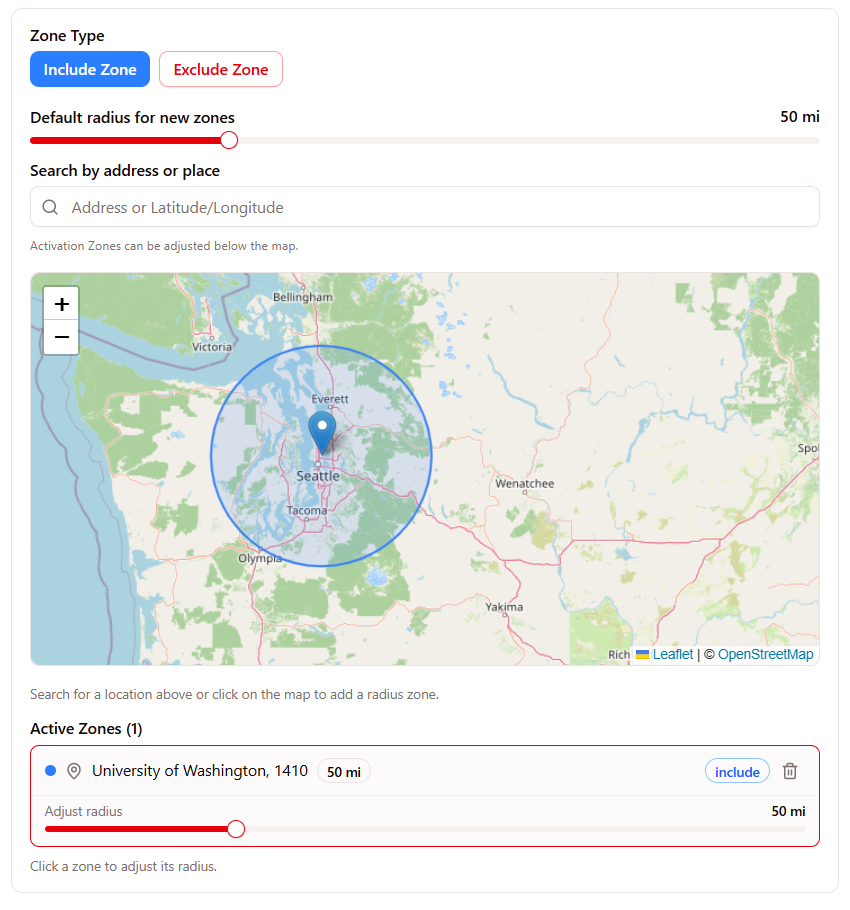
Any shape you can draw.
- Click the map to draw a custom shape around any boundary, vertex by vertex
- Capture footprints a circle can't: stadiums, campuses, malls, neighborhoods, districts
- Unlimited vertices, unlimited polygons, include or exclude each one
- Pixel-precise so you fence the venue and not the freeway next to it
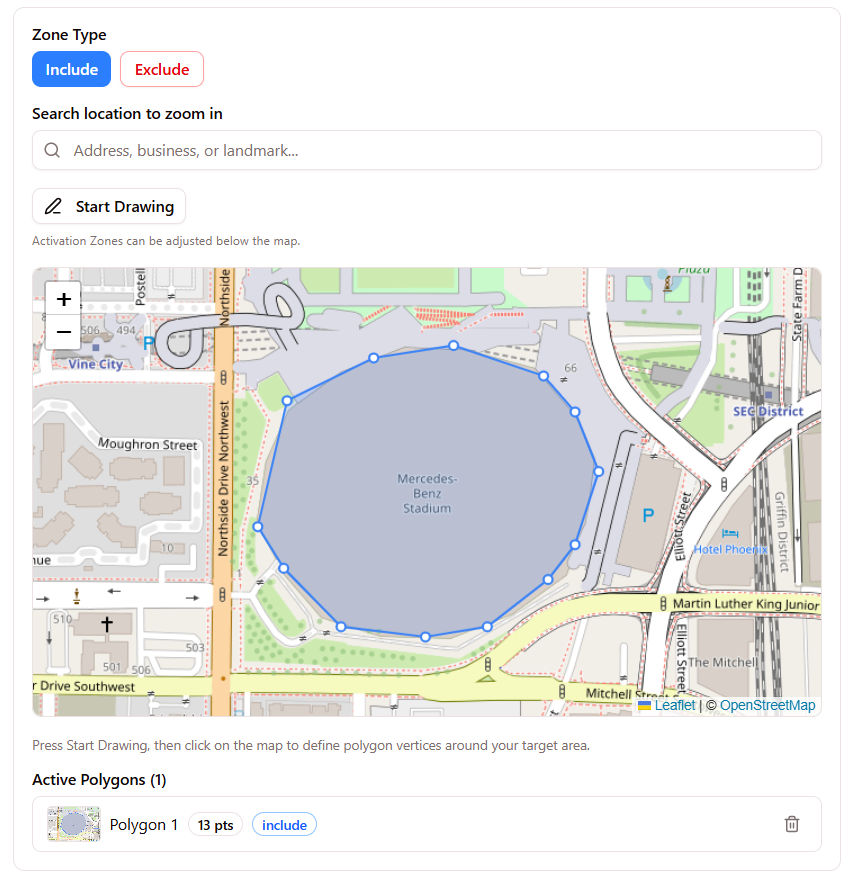
Real builder screens. Geofences activate against live programmatic inventory in your target locations.
Common geofencing uses
Use radius and polygon targeting for these common campaign types.
Retail trade areas
Fence the few miles a store actually draws from and stop wasting spend on shoppers who will never make the drive.
Competitor conquesting
Target the people standing in a rival's location and intercept the purchase with a better offer.
Events & conferences
Reach attendees on the show floor, then follow up with the same devices for days after the event ends.
Campuses & enterprise
Draw a polygon around a university, hospital, or office park to reach students, staff, or a specific workforce.
Districts & advocacy
Fence a precise political or service boundary so your message stays inside the lines that matter.
QSR & drive-time
Pair a radius around each location with a daypart so the lunch offer lands right before lunch.
Follow up after a visit
Eligible devices seen inside your geofence can join a retargeting audience for follow-up ads after the visit.
- Every device seen inside your geofence becomes part of a retargetable audience
- Follow those visitors after they leave with display, video, CTV, and audio
- Turn a one-time, in-the-moment impression into a multi-day, multi-screen sequence
- No separate list to build. The audience is captured from the fence you already drew
How it flows
1. They enter your fence
A device shows up inside your radius or polygon.
2. We capture the audience
That device joins a retargetable group, automatically.
3. They see you everywhere
Follow-up across display, video, CTV, and audio.
Geofence any channel you run.
Geofencing is not a separate product. It is a targeting layer that rides on the channels you already use. Draw the zones once, apply them anywhere.
Set up your geofenced campaign
The guided wizard handles the math, the specs, and the tracking strategy. You draw the fences. Most campaigns are built in minutes.
Set your goal and budget
Pick an objective and a budget. Geofencing rides on the tactics you choose, with a $1,000 campaign minimum. Delivery estimates update as you type.
Build your audience
Layer 750+ segments, contextual keywords, and first-party lists. Manifold Intelligence recommends segments to pair with your locations.
Drop your geofences
Pin an address and set a radius, or click the map to draw a custom polygon. Add as many zones as you like, include or exclude each.
Choose channels and schedule
Run the fence across display, video, CTV, native, or audio, and add dayparting so ads serve only when it counts.
Upload creative and submit
Drop in your creative, review the plan with every zone called out, then submit for launch. Most campaigns are built in minutes.
Inside the wizard · Draw a custom polygon on the map
Add audience and schedule settings
Refine location targeting with audience and timing settings. Layer audience, device, and schedule on top of every zone.
Radius geofences
Circular fences around any address or coordinate, sized in miles, stacked and include/exclude in the same campaign.
Custom polygons
Hand-drawn boundaries for the shapes circles miss, like venues, campuses, neighborhoods, retail footprints, and districts.
Audience + schedule
Layer 750+ segments, device types, dayparting, and frequency caps on top of every fence for total precision.
Campaign details
Miles
Radius unit
Unlimited
Polygon vertices
Unlimited
Zones per campaign
Both
Include / exclude
$0
Geofencing fee
$1,000
Campaign minimum
Geofencing is included at no extra cost. See the full inventory or learn why teams choose Manifold.